
Guides
How to Use a Block Explorer to Check Any Transaction (2026)
A block explorer is a public search engine for a blockchain. How to find your TXID, pick the right explorer, and read every field that matters.
Published: September 2026 · By the bsvar editorial team
Short answer: a block explorer is a public search engine for a blockchain. Paste a transaction hash (TXID) into the explorer for the network the transaction actually used, and it tells you definitively whether the transfer happened, where it went, and whether it is final. It is the one source that neither the sender nor the receiver can spin.
Learning to read one entry properly is the difference between "my money vanished" and "it confirmed 40 minutes ago and the exchange needs 20 confirmations".
What an explorer can and cannot tell you
It can tell you: whether a transaction exists, its status, how many confirmations it has, the exact sending and receiving addresses, the amount, the token contract involved, the fee paid, and the timestamp.
It cannot tell you: who owns an address, why a transfer was made, or whether an exchange has credited your internal account balance. On-chain arrival and account crediting are two separate events — the second happens inside the exchange's own database.
That last distinction resolves most "the explorer says success but my balance is empty" confusion.
Picking the right explorer
Each network has its own. Using the wrong one returns nothing, which people frequently misread as "my transaction disappeared".
| Network | Explorer |
|---|---|
| Bitcoin | mempool.space, blockchair.com |
| Ethereum | etherscan.io |
| Tron | tronscan.org |
| BNB Smart Chain | bscscan.com |
| Polygon | polygonscan.com |
| Arbitrum | arbiscan.io |
| Solana | solscan.io |
Reach explorers by typing the address yourself, or from a link in your wallet or exchange. Search-engine ads for explorer names are a known phishing vector. And note that no legitimate explorer ever asks you to connect a wallet or enter a seed phrase to look up a transaction — it is a read-only public database.
If you do not know which network your transaction used, check the withdrawal record on the sending platform. It states the network.
Finding your TXID
The transaction hash is a long string, usually starting 0x on EVM chains. You will find it:
- On an exchange: withdrawal history → the specific transaction → TXID or "transaction ID".
- In a wallet: the activity or history list → tap the transaction → view on explorer.
Copy it exactly. A truncated hash returns nothing.
Reading the result
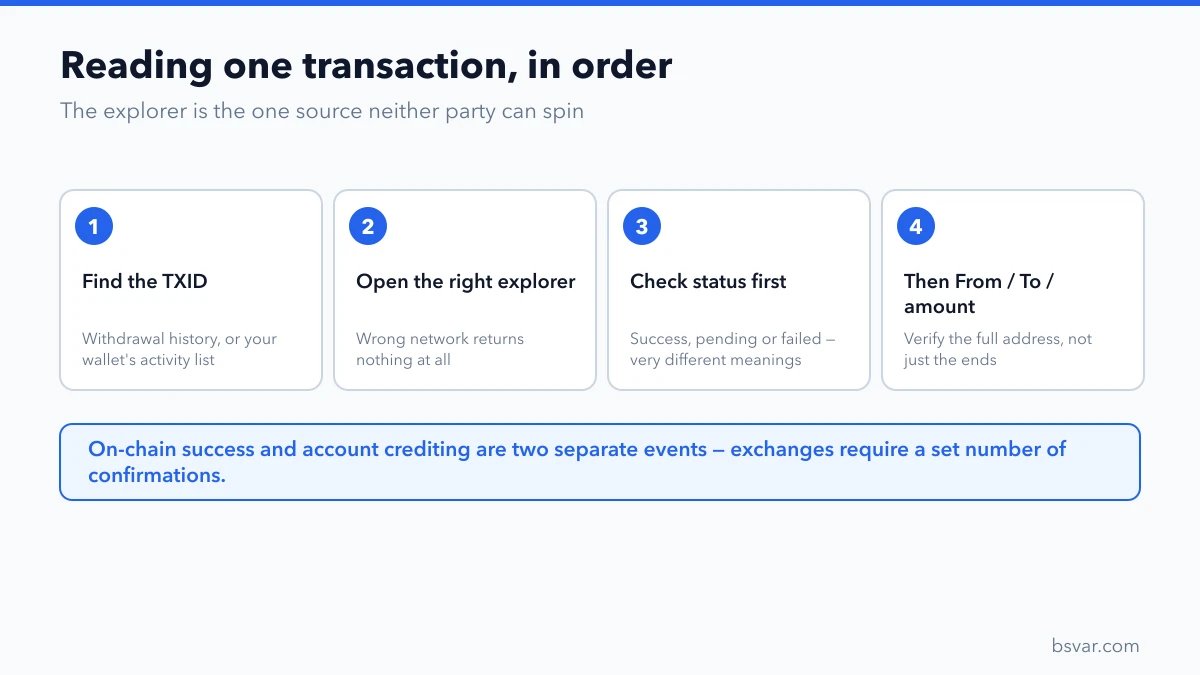
Paste the hash into the explorer's search box. Then check these fields in order:
1. Status. Three possibilities, with very different meanings:
- Success / Confirmed — the transaction executed. The funds moved.
- Pending — broadcast but not yet included in a block. Still in progress.
- Failed — it did not execute. On EVM chains you still paid gas, but the transferred amount stayed in your wallet. Check your balance before concluding you lost anything.
2. Confirmations. How many blocks have been built on top. More confirmations means more final. Exchanges require a specific number before crediting, which differs by network and platform — this is usually why on-chain success has not become an account balance yet.
3. From and To. Verify the receiving address matches the one you intended, character for character. This is where you discover a wrong-address or address-poisoning error.
4. Amount and token. For a token transfer, confirm the token contract is the one you expected. Fake tokens with real-looking names are common.
5. Network. Confirm it is the chain you meant to use. If it is not, read Sent USDT on the Wrong Network? How to Recover It.
6. Timestamp and fee. Useful for support tickets.
The three situations this resolves
"It says success but nothing arrived." Almost always one of: the receiving platform has not reached its required confirmation count; the token needs adding manually in your wallet; or the transfer went to the right address on the wrong network. The explorer distinguishes all three.
"It has been pending for hours." On a busy network, an underpriced transaction can wait. Some wallets offer a speed-up or cancel option for pending EVM transactions. Do not send a duplicate — if the original later confirms, you have sent twice.
"I need to prove I sent it." The explorer link is the evidence. It is public, timestamped and independent of both parties. Include it in any support ticket.
Reading a token transfer specifically
A common trap: for an ERC20 or TRC20 token transfer, the "value" field on the main transaction view often shows 0, because no native coin moved. The token movement appears in a separate section, usually labelled Tokens Transferred or TRC20 Token Transfer.
Seeing 0 there does not mean the transfer failed. Scroll to the token section.
Safety rules
- Type the explorer address yourself; do not click ads.
- An explorer is read-only. Any page asking you to connect a wallet or enter a seed phrase to check a transaction is a fake.
- Do not post your TXID publicly with a request for help — it marks you as someone who just lost money.
- Ignore anyone who contacts you after seeing your transaction. Explorers are public, and scammers watch them.
FAQ
Is a block explorer free?
Yes. Blockchain data is public, and reading it costs nothing.
Can I see who owns an address?
No. Addresses are pseudonymous. Some explorers label known exchange addresses, but ordinary addresses are not attributable.
Can an explorer cancel or reverse a transaction?
No. Explorers only read data. A confirmed transaction cannot be reversed by anyone.
Why does my transaction not appear?
Usually the wrong explorer for the network, an incomplete hash, or the transaction was never actually broadcast. Check the sending platform's record first.
What does "failed" mean — did I lose the money?
The transfer did not execute, so the amount stayed with you. On EVM chains the gas was still consumed. Check your wallet balance to confirm.
How many confirmations are enough?
It depends on the network and on the receiving platform's policy. The platform's stated requirement is the number that matters to you.
Related guides
- Crypto Transfer Not Arrived? Check the TXID First
- Sent USDT on the Wrong Network? How to Recover It
- What Is a Memo or Tag? What Happens If You Forget It
- Address Poisoning: Why the Address You Copied Was Wrong
Educational content, not financial advice. Explorer interfaces and confirmation requirements change; verify current details with your wallet or platform. See our Advertising & Commission Disclosure.