Guides
How to Sign Up on Binance: A Beginner's Walkthrough (2026)
A beginner's walkthrough to signing up on Binance, with region notes and post-signup steps.
Last updated: June 2026 · By the bsvar editorial team
Binance is the world's largest crypto exchange by volume. This walkthrough gets a beginner signed up from scratch. Still deciding between platforms? See OKX vs Binance.
⚠️ Risk warning: Crypto is risky and volatile. This is an operational tutorial, not investment advice (DYOR). See our Disclaimer.
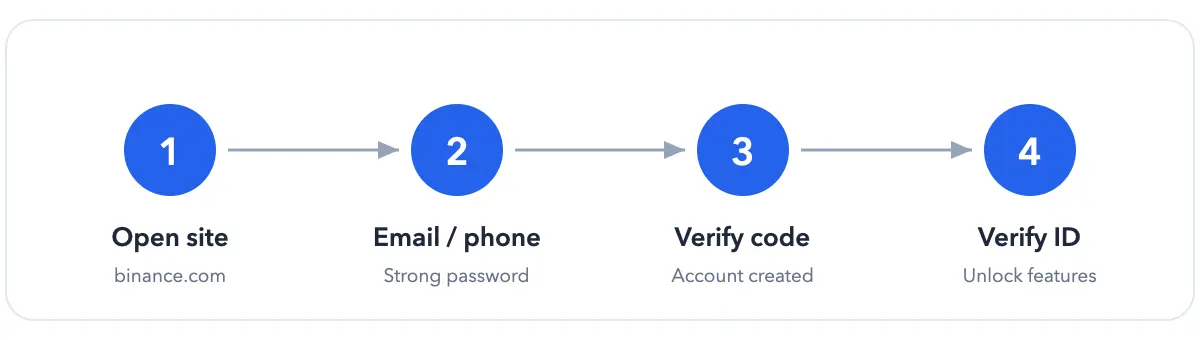
The sign-up flow at a glance
Before you start
- An email or phone number;
- A strong, unique password;
- Confirm Binance is available where you live (US users need Binance.US).
Step by step
- Open the official site: 👉 Go to Binance
- Sign up with email or phone and set your password;
- Enter the verification code;
- Done — your account is created.
Right after signing up
- Turn on 2FA to lock down your account;
- Complete identity verification (KYC) to unlock deposits, trading and withdrawals — a passport works well internationally.
FAQ
Binance or OKX for beginners? Many newcomers find OKX's onboarding smoother, while Binance leads on coins and liquidity — see the comparison. Can I use Binance in the US? US users must use Binance.US, not the global site — confirm what's available in your region. How do I buy after signing up? Verify, deposit, then buy — the flow mirrors OKX; see How to Buy Bitcoin.
Next steps
Confirm the regional service before signing up
Binance services can be provided by different entities in different regions, with different products, verification rules, and funding rails. Another user’s screenshot does not prove a feature is available to you. Enter through the official domain and check the entity and terms displayed for your location.
After registration, use a unique password and strong two-factor authentication, verify anti-phishing details in official emails, and never provide a code or screen-sharing session to unsolicited support. Test both deposits and withdrawals with a small amount. If your location uses a separate regional service, follow only that service’s official help pages.
bsvar is independent from Binance and is not its official site. Official pages prevail. See our Advertising & Commission Disclosure.