
Security
Fake Support Scams: Six Tells That Never Change (2026)
Real support never contacts you first, never asks for a code, and never needs remote access. Six tells, plus what to do if you already engaged.
Published: September 2026 · By the bsvar editorial team
Short answer: real support never contacts you first, never asks for a code or seed phrase, and never needs remote access to your device. Those three rules alone stop nearly every version of this scam, regardless of how convincing the profile, logo or phone number looks.
The single most useful habit: never act on inbound contact. Close it, open the official app yourself, and check whether the problem actually exists.
Why this scam is so effective
It does not attack your wallet. It attacks you at the exact moment you are already worried — a stuck withdrawal, a locked account, a transfer that has not arrived. You are looking for help, and someone appears offering exactly that.
The attacker has an advantage you may not realise: your problem is often visible. Public forums, social media replies, app store reviews and blockchain explorers all leak the fact that you are in trouble. Scammers monitor them and reach out within minutes. That speed feels like good service. It is targeting.
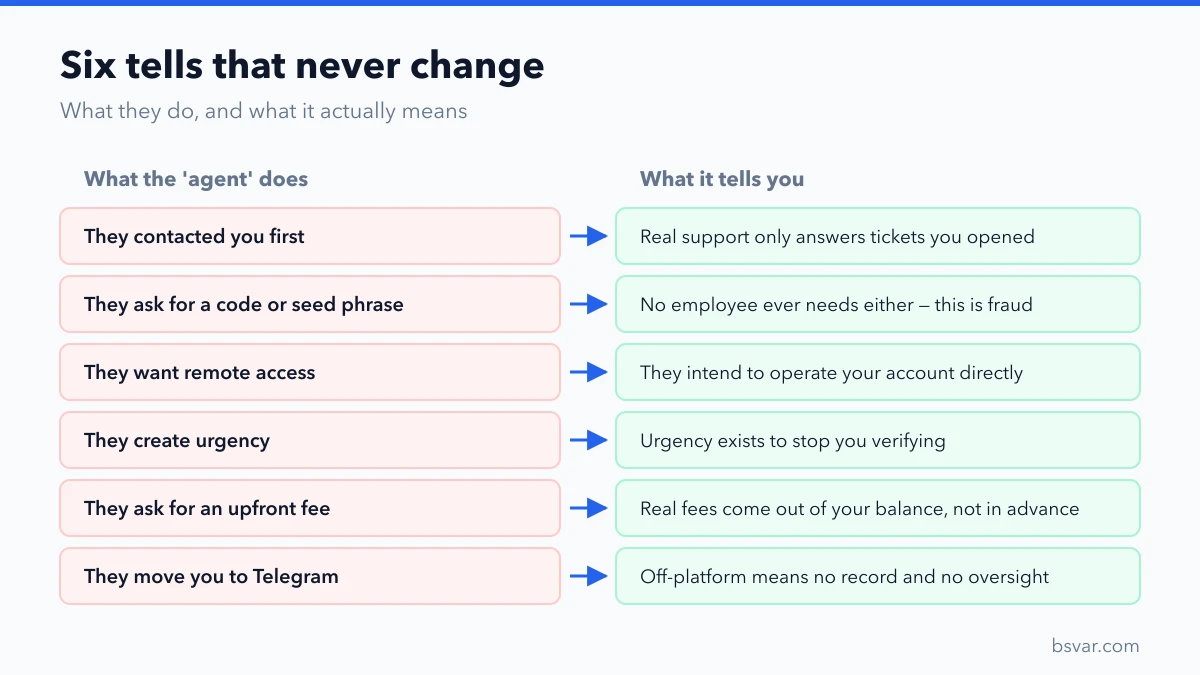
Six tells that never change
1. They contacted you first. Real support responds to tickets you opened; it does not appear in your DMs, comments, or on your phone unprompted. Any inbound contact about your account is suspect by default — including one that arrives right after you posted about a problem.
2. They ask for a code, password or seed phrase. No legitimate employee ever needs your 2FA code, SMS code, password or recovery phrase. The seed phrase request is unambiguous fraud. The code request is how account takeover actually happens — they trigger a login, and you read them the code.
3. They want remote access. Any request to install AnyDesk, TeamViewer, a "diagnostic tool", or to share your screen while you log in, is an attempt to operate your account directly.
4. They create urgency. "Your funds will be permanently lost in 30 minutes." Urgency exists to stop you verifying. Real reviews are slow, and no legitimate process punishes you for taking an hour to check.
5. They ask for an upfront payment. Framed as an unlock fee, gas activation, clearance, tax, or a deposit to "verify" your wallet. Legitimate exchange fees are deducted from your balance, never paid in advance to an individual.
6. They move you to another channel. From a public comment to a private message, from the platform to Telegram or WhatsApp. Off-platform means no record and no oversight. Real support stays inside its own ticket system.
Where the fakes appear
- Search results and ads. Ads bought against searches like "binance support number". The top result is not necessarily official.
- Social media replies. Accounts with copied avatars and near-identical handles reply to anyone complaining about a platform.
- Telegram and Discord. Bots scan public groups for keywords like "locked" or "not credited" and DM instantly.
- App stores. Fake apps with real-looking branding, sometimes with fabricated reviews.
- Phone calls. Caller ID is trivially spoofed. A number that matches the official one proves nothing.
- Email. Sender names are display text; the underlying address is what matters, and even that can be forged convincingly.
The verification routine
When anyone claiming to be support contacts you:
- Do not reply. Engaging costs you nothing to skip and gives them nothing to work with.
- Open the official app or website yourself, typed or bookmarked — never through the link you were sent.
- Check whether the issue is real. If your account is genuinely restricted, the notice appears inside your account.
- Open a ticket through the official channel if there is a real problem.
- Report and block the account that contacted you.
If you are genuinely uncertain whether an email is authentic, check whether it carries your anti-phishing code. Setting one up is a five-minute change that makes genuine platform emails identifiable at a glance.
If you already engaged
Move quickly, in this order:
- Disconnect any remote-access session and uninstall the tool.
- Change your password from a different, trusted device.
- Reset your 2FA so any captured setup key is void.
- Revoke active sessions and API keys.
- Check your withdrawal whitelist for entries you did not add.
- Contact real support through the official app and report the compromise.
- If you shared a seed phrase, treat that wallet as permanently lost. Move any remaining funds to a newly created wallet immediately — do not reuse the compromised one. See Seed Phrase Exposed? An Emergency Wallet Plan.
Then expect a second wave. Victim lists get resold, and "recovery specialists" will contact you next. That is the same scam wearing a different costume.
FAQ
Does real support ever call me?
Generally not without you requesting it through an official channel first. Treat an unexpected call as fraudulent until independently verified.
They knew my name and balance. Doesn't that prove it's real?
No. Data breaches, public blockchain activity and your own public posts all leak details. Knowing things about you is a persuasion tactic, not proof of identity.
The number matched the official one exactly.
Caller ID spoofing is easy and cheap. Never treat a displayed number as verification.
Can support help faster if I pay?
No. There is no legitimate paid queue-jumping, and the offer itself identifies the contact as fraudulent.
I gave them a 2FA code but nothing happened yet.
Act now anyway. Change your password, reset 2FA, and revoke sessions immediately.
How do I find real support?
Only from inside the official app or website that you navigated to yourself. Never from a search ad, a message, or a link.
Related guides
- Binance Account Restricted or Locked? Tell the Two Apart First
- Binance 2FA: How to Set It Up, Back It Up and Recover It
- How to Spot a Fake Exchange or App
- Seed Phrase Exposed? An Emergency Wallet Plan
Educational content, not financial advice. Scam techniques evolve; treat this as a description of recurring patterns rather than an exhaustive list. See our Advertising & Commission Disclosure.