
Security
Hardware Wallets: How to Choose One and When You Actually Need It (2026)
A hardware wallet keeps your keys offline. When you actually need one, how to choose safely, and the mistakes that still lose funds.
Published: September 2026 · By the bsvar editorial team
Short answer: a hardware wallet keeps your private keys on a dedicated offline device, so a compromised phone or computer cannot sign transactions on your behalf. You need one when the amount you hold in self-custody is large enough that losing it would genuinely hurt. Below that threshold, a well-backed-up software wallet and a properly secured exchange account are reasonable.
A hardware wallet protects against a compromised device. It does not protect against approving a malicious transaction yourself — which is how most hardware-wallet users actually lose funds.
What it actually does
Your private key is what authorises spending. In a software wallet, that key exists on a device that also browses the web, installs apps and receives messages — every one of which is an attack surface.
A hardware wallet stores the key on a separate device that never connects to the internet directly. When you want to send funds:
- Your computer or phone builds the transaction.
- It is sent to the hardware wallet.
- The device shows the details on its own screen.
- You physically confirm with a button.
- The device returns a signature. The key itself never leaves.
Step 3 is the part that matters most, and it is the step people skip. The device's screen is trustworthy in a way your computer's screen is not — malware can alter what your computer displays, but not what the hardware wallet shows.
When you actually need one
You probably need one if:
- The amount in self-custody would be a serious loss.
- You hold long-term and rarely transact.
- You interact with DeFi or sign contract transactions.
- You have previously had a device compromised.
You probably do not need one yet if:
- You hold a small amount you could afford to lose.
- Everything you own is on a reputable exchange, secured with authenticator 2FA and a withdrawal whitelist.
- You are still learning the basics.
There is a real trade-off. Self-custody removes company risk and replaces it with you risk. If you are not confident you can store a seed phrase safely for years, an exchange account with strong security settings may genuinely be safer for you today. That is not a beginner's excuse — it is an honest assessment of where the failure modes are.
Choosing one
Buy directly from the manufacturer. Never from a marketplace listing, an auction site, or a reseller — and never a used one. A tampered device can be pre-configured with an attacker's seed. This is the single most important rule in this article.
A pre-filled seed phrase means the device is compromised. A genuine device generates the seed in front of you, on first setup. If a card in the box lists a recovery phrase, do not use it. That is a known scam.
Then compare on:
- Coin support — verify the specific assets and networks you hold.
- Connectivity — USB, Bluetooth, or QR-based air-gapped signing.
- Screen size — a larger screen makes verifying full addresses and contract details realistic rather than theoretical.
- Open-source firmware — allows independent review.
- Secure element — dedicated tamper-resistant chip.
- Recovery standard — most use the standard 12/24-word format, which means you are not locked to one brand.
Setting it up safely
- Inspect the packaging for tampering. Contact the manufacturer if anything looks wrong.
- Update the firmware using the official application only.
- Let the device generate the seed phrase itself.
- Write the phrase on paper or metal. Never photograph it, type it, or store it in any cloud service, password manager or note app. A phrase that touches an internet-connected device has lost the entire benefit of the hardware wallet.
- Verify the backup by following the device's own recovery check.
- Set a PIN you can remember but others cannot guess.
- Store the backup somewhere safe — ideally two locations, protected from fire and water. Metal backup plates exist for this reason.
- Test with a small amount before transferring anything significant.
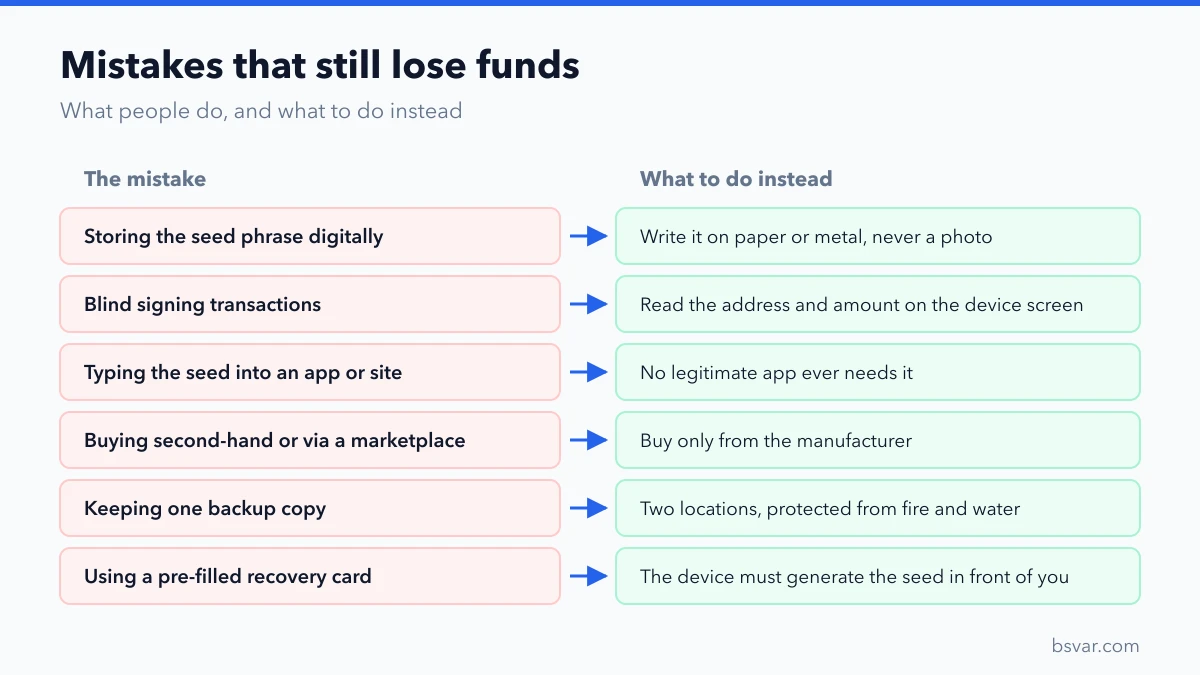
The mistakes that still lose funds
- Storing the seed phrase digitally. The most common fatal error. A photo in your camera roll defeats the device entirely.
- Blind signing. Approving a transaction without reading the device screen. If you do not verify the address and amount on the device, you have a very expensive USB stick.
- Entering the seed phrase into software. No legitimate app, website or support agent ever needs it. This is the standard hardware-wallet scam.
- Buying second-hand or from a marketplace.
- Only one backup copy. Fire, flood and loss are real.
- Telling people you own one. This creates a physical-security problem.
- Forgetting the passphrase, if you enabled the optional extra word. It is unrecoverable, and there is no support route.
It is not a complete solution
A hardware wallet solves key storage. It does not solve:
- Approving a malicious contract. You confirmed it. See How to Revoke Token Approvals Safely.
- Sending to the wrong address. Including an address-poisoning lookalike — verify the full address on the device screen.
- Losing the backup. No recovery exists.
- Physical coercion.
- Choosing a bad asset. It stores things; it does not evaluate them.
FAQ
What happens if the device breaks or is lost?
Your funds are on the blockchain, not on the device. Restore the seed phrase onto a new device — usually any compatible one, since the recovery standard is shared.
Can I use the same seed on two devices?
Yes, that is exactly how recovery works. Some people keep a second device as a backup, though a securely stored phrase achieves the same result.
Is a hardware wallet safe from hackers?
It removes remote key extraction as a realistic threat. It does not remove your ability to authorise a bad transaction.
Do I need one for a small amount?
Usually not. Match the protection to the value.
Can I use it with a DEX?
Yes, and it is where the benefit is clearest — you can verify contract interactions on the device screen before signing.
Should I buy on sale from a marketplace?
No. Buy from the manufacturer. The saving is not worth the supply-chain risk.
Related guides
- Cold vs Hot Wallet: What's the Difference and How to Choose
- Seed Phrase Exposed? An Emergency Wallet Plan
- How to Revoke Token Approvals Safely
- Address Poisoning: Why the Address You Copied Was Wrong
Educational content, not financial advice, and not an endorsement of any specific product. Verify current device support and official purchase channels before buying. See our Advertising & Commission Disclosure.