
Guides
OKX KYC Verification: Documents, Face Scan and Fixes (2026)
OKX KYC requirements and steps: which documents work, how to photograph them so they pass, how to clear the face scan, and what to change after a rejection.
Last updated: August 2026 · By the bsvar editorial team
In short: OKX identity verification asks for accurate personal details, a clear photo of a supported government-issued document, and a live face scan that matches it. For an international user a passport is usually the most reliable choice, because it is recognised regardless of where you currently live. Most rejections come from the photo, not from you being ineligible. Not signed up yet? See How to Sign Up on OKX.
⚠️ Risk warning: This is an operational tutorial, not investment advice. See our Disclaimer.
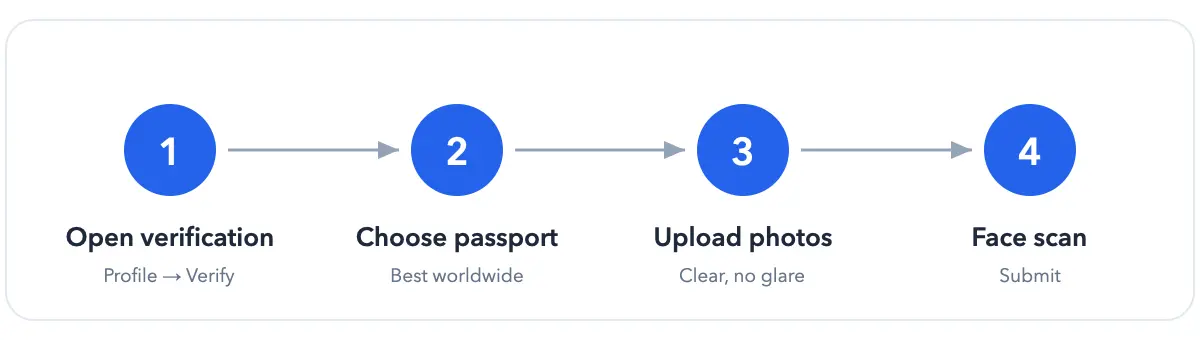
The verification flow at a glance
Why verification is required
Exchanges operate under anti-money-laundering and know-your-customer (AML/KYC) obligations. Verification is what connects an account to a real, identifiable person, and it is a condition of access rather than an optional extra — unverified accounts are typically restricted from deposits, trading and withdrawals.
Verification is also tiered. A basic level unlocks core functionality; higher levels raise limits and open additional products, and may request further evidence such as proof of address. Tier names, limits and requirements vary by region and change over time, so read what your own account displays rather than any figure quoted in a guide.
A useful consequence: if a specific feature is blocked, check which tier it needs before concluding that your verification failed. Sitting at a lower tier is not a rejection.
What you'll need before you start
| Item | What to check |
|---|---|
| Personal details | Legal name, date of birth and nationality exactly as they appear on the document |
| Identity document | Unexpired, undamaged, and listed as supported on your own verification screen |
| Camera | Lens clean; the device camera, not a stored photo or scan |
| Lighting | Even, indirect light with no glare on the document and no backlight on your face |
| Time | A few uninterrupted minutes on a stable connection |
| Address evidence | Only if your flow requests it — follow the document type and date rules shown |
A passport, national identity card or driver's licence may appear as options, but availability depends on your region and account. The list inside your account is the authoritative one.
Step by step
- Go to Profile → Identity Verification.
- Choose your country/region and document type — a passport is usually the most portable option for users living outside their home country.
- Upload the document photos as prompted, following the framing guides on screen.
- Complete the face scan.
- Submit and wait. Approval commonly takes minutes to a few hours, but a manual review takes longer.
Photographing the document so it passes first time
The automated check is looking for a specific set of signals. Knowing them turns a retry into a pass:
- Security features must be visible. Holograms, microprint and background patterns are part of what is being verified. A photocopy, a scan or a photo of a screen removes them — which is why those fail even when the text is perfectly readable.
- All four corners in frame, with a small margin. A cropped edge reads as a partial or altered document.
- The machine-readable zone must be sharp. On a passport this is the two lines of
<<<-separated characters along the bottom. Blur there alone can fail an otherwise good photo. - Shoot flat and straight on. Angling the document keystones the text and distorts the layout the check expects.
- No flash on a laminated page. Direct flash creates a hotspot that hides exactly the features being inspected. Use ambient light instead.
- Plain background. A patterned surface interferes with edge detection.
Before submitting, compare the spelling, name order, date of birth and document number against the details entered in your account. Transliteration differences and middle names are a frequent cause of a "details do not match" result even when the identity is genuinely the same person.
Passing the face scan
The face scan confirms two separate things: that your face matches the document photo, and that a live person is present rather than a photo or recording. The movement prompts exist for that second check.
- Face a window or soft light. Light on your face, not behind you — backlighting is the most common single cause of failure.
- Hold the device at eye level and brace your arms; an outstretched arm shakes.
- Remove glasses, hats, masks and headphones. Prescription lenses often glare over the eyes.
- Turn off beauty filters and portrait smoothing — they change facial geometry.
- Be alone in frame.
- Move slowly when prompted; fast motion produces blur that reads as an inconsistency.
If the camera never opens, that is a device permission problem rather than a verification failure. Check the camera permission for the official OKX app, close other apps using the camera, and restart the flow.
If verification fails
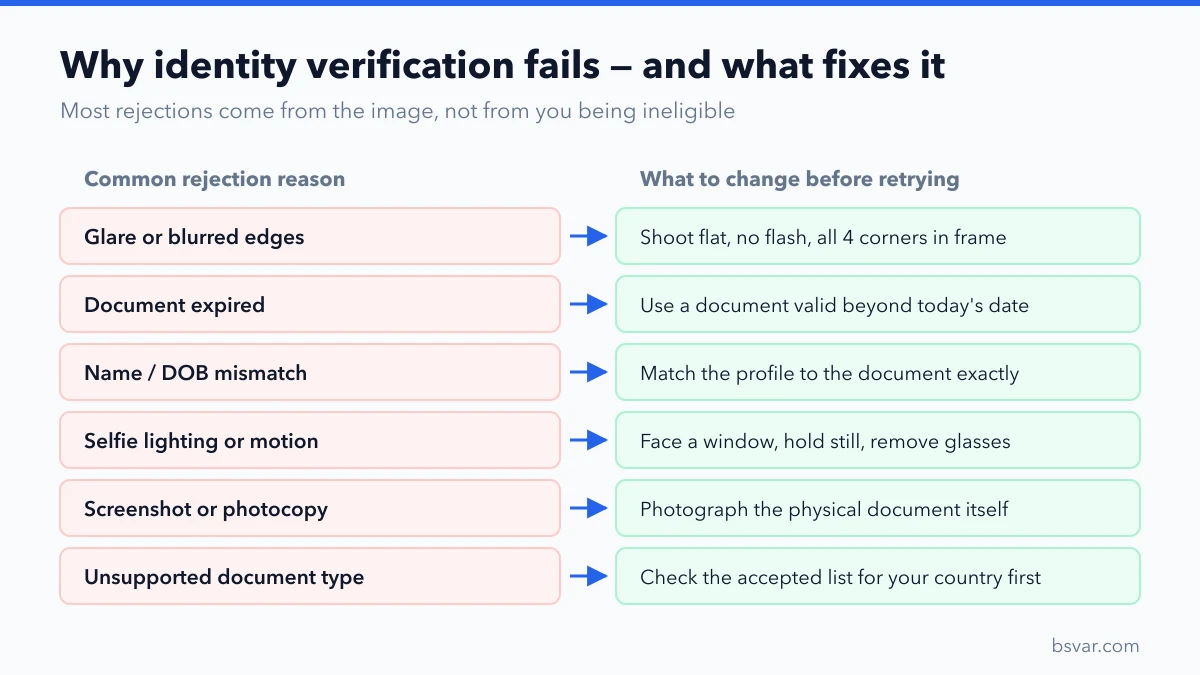
Save the exact error message, the time of the attempt and the document type you selected. Then change one thing at a time:
- Blurry or glare — retake in even, indirect light on a plain surface.
- Details do not match — correct whichever field is genuinely inaccurate, so the account matches the document.
- Document not supported — return to the selection screen and choose from the options actually listed for your account.
- Face scan fails — improve lighting, remove obstructions, disable filters, retry when the account permits.
- Repeated failures — use official OKX support only. Never use a "verification agent"; handing your documents and account access to a third party is one of the most common ways accounts are stolen.
Do not repeatedly change nationality, residence or document-issuing country just to reveal a different document list. Nationality, issuing country, current residence and tax residence are four different facts, and inaccurate entries create a harder problem than the one you started with.
A pre-submission checklist
Confirm the document is unexpired, the name matches the account, all four corners are visible, and there is no glare or obstruction. Use even lighting for the face scan and disable beauty filters. If address information is requested, enter your real residence and prepare a recent document that meets the stated requirements.
OKX notes that accepted documents and available features vary by customer and region, and that account verification can only be discussed with the account holder. Primary reference: OKX identity-verification guide.
FAQ
Must I use a passport?
No — use any document type your account lists. A passport is simply the most reliable option internationally, because it does not depend on your current country of residence.
How long does OKX verification take?
Commonly minutes to a few hours for the automated path. Manual reviews take longer and do not always show a progress indicator. Follow the status in your account rather than a third-party estimate.
Why does my face scan keep failing?
Usually lighting or movement. Face a window, hold the device steady at eye level, remove glasses and filters, and make sure no one else is in frame.
Can I verify with someone else's document?
No. Submitting another person's identity is a violation that can permanently close the account, and it leaves you with no legitimate route to recover funds.
Is it safe to upload my passport?
Identity verification is standard at every regulated exchange. The real risk is where you upload it. Only ever use the official OKX site or app, reached by typing the address yourself — not a link from a message. See How to Spot a Fake Exchange or App.
What if my name is written differently on my ID?
Enter it exactly as printed on the document you are submitting, including transliteration and name order. Consistency with the document matters more than the form you normally use.
Does support ever ask for my password or verification code?
Never. Official support does not need your password, authenticator code, SMS code, seed phrase or remote access to your device. Anyone offering paid "fast-track approval" is not a legitimate route.
Next steps
- How to Deposit USDT on OKX
- The Complete OKX Guide
- How to Withdraw from OKX
- Binance KYC Verification: Documents, Selfie and Failure Fixes
- Is OKX Safe? An Honest Review + Security Settings
bsvar is an independent third-party guide, not affiliated with OKX. Official pages prevail. See our Advertising & Commission Disclosure.