
Guides
How to Sign Up on OKX: A Beginner's Walkthrough (2026)
A beginner's walkthrough to signing up on OKX, with the security basics covered.
Last updated: June 2026 · By the bsvar editorial team
Creating an OKX account is your first step into crypto. This walkthrough gets a complete beginner signed up and ready, with the security basics covered. Want the full picture? See The Complete OKX Guide.
⚠️ Risk warning: Crypto is risky and volatile. This is an operational tutorial, not investment advice (DYOR). See our Disclaimer.
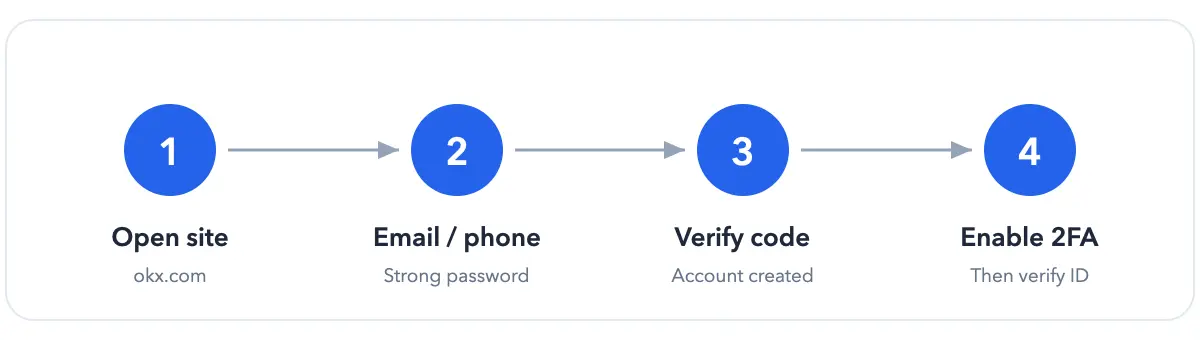
The sign-up flow at a glance
Before you start
- An email or phone number you'll keep long-term;
- A strong, unique password (letters + numbers + symbols);
- Confirm OKX is available where you live.
Step by step
- Open the official site: 👉 Go to OKX
- Sign up with email or phone, and set your password;
- Enter the verification code you receive;
- Done — your account is created.
Two things to do right away
- Turn on 2FA (Google Authenticator) under Security settings;
- Verify your identity (KYC) — required to deposit, trade and withdraw. See OKX KYC Verification.
FAQ
Email or phone — which is better? Either works; use one you'll keep and can receive codes on. Do I need a referral code? No, you can sign up without one. What's next? Verify your ID, then deposit USDT.
Next steps
Five details that prevent account problems
- Type the official domain yourself before downloading the app. 2. Use an email and phone number you expect to control long term. 3. Never reuse the password from your email or another exchange. 4. Enable an authenticator or passkey immediately. 5. Store recovery information offline rather than as a cloud screenshot.
A registered account does not guarantee every product is available. Verification, funding methods, products, and limits vary by location. When the interface differs from this guide, follow the notice inside your account. A real support agent will not ask for your code, request remote control, or demand a transfer to “activate” the account. Verify current steps through the OKX Help Center.
bsvar is an independent third-party guide, not affiliated with OKX. Official pages prevail. See our Advertising & Commission Disclosure.