Guides
How to Deposit USDT on Binance Without Picking the Wrong Network (2026)
A network-first Binance USDT deposit workflow with a small test and a TXID-based missing-deposit checklist.
The safest network is not automatically the cheapest one. It is the network supported by both the sender and Binance’s current USDT deposit page. Matching address formats do not prove that two networks are interchangeable.
Deposit workflow
- Enter Binance through the official app or domain and choose Deposit Crypto.
- Select USDT.
- Check which network the sending wallet or exchange can use, then choose the exact same network on Binance.
- Copy the newly displayed Binance address and any memo/tag.
- Compare the first and last six address characters at the sender.
- Send a small test within the platform’s minimum rules.
- Save the TXID and deposit record; scale up only after credit.
TRC-20, ERC-20, or another network?
Check four live values: sender availability, Binance deposit availability, withdrawal fee at the sender, and the minimum/confirmation requirement at Binance. These change over time. A cheap network is useless if the recipient does not support it.
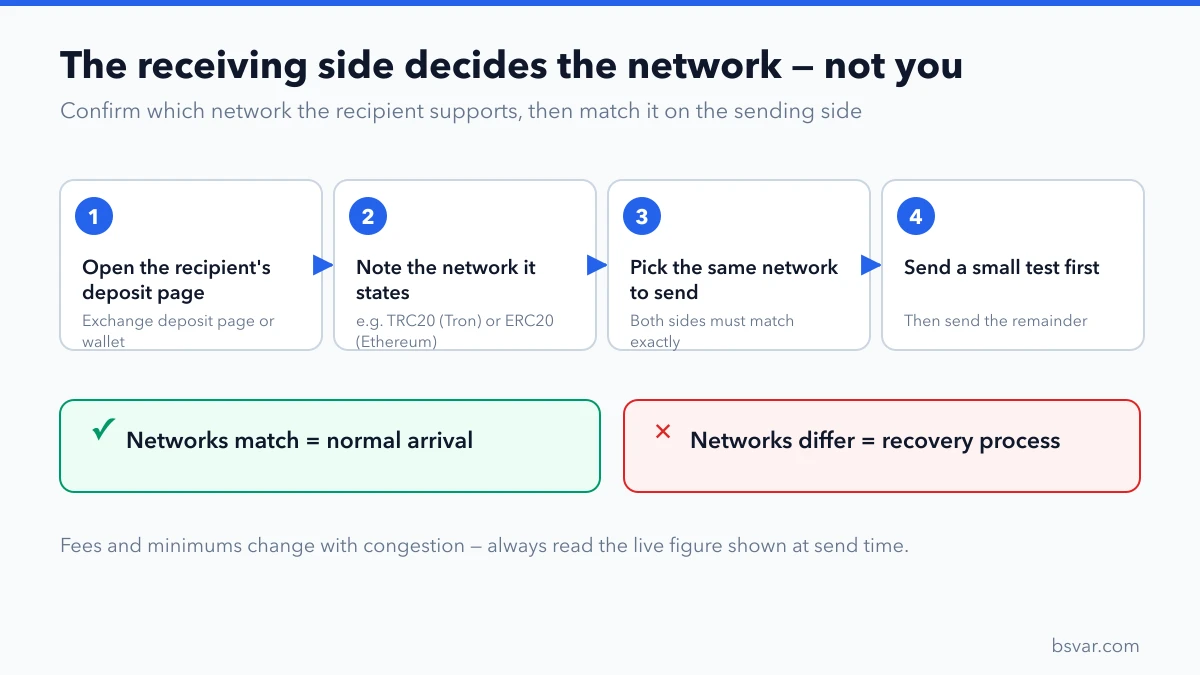
The deposit page decides the network — the address format does not.
Missing deposit decision tree
No TXID means the sender may not have broadcast the transfer. Pending means the network has not finalized it. Success means you should compare address, actual network, confirmations, and memo/tag, then submit the hash to Binance. An unsupported network may require a recovery request, which is not guaranteed.
Binance Academy’s current guide also instructs users to match the deposit network with the sending network and to verify addresses and official channels: Deposit/Withdrawal Guide.
Avoid these mistakes
- Entering through a search ad or chat link.
- Reusing an old saved deposit address without checking.
- Ignoring a memo/tag requirement.
- Sending the full amount before a test.
- Giving a recovery phrase to someone offering deposit recovery.
Why the cheapest network is the wrong starting question
Fee comparison feels like the decision, but it is the last step, not the first. The binding constraint is what the sending side can actually do and what Binance's current deposit page for USDT actually accepts. A network that is cheap but unsupported at either end is not an option at all.
Work in this order and the fee question resolves itself safely: establish which networks the sender supports, intersect that with what the Binance deposit page currently lists, and only then compare the fee among what remains. Optimising for cost before establishing compatibility is how wrong-network transfers happen.
Reading the deposit page correctly
Four things on that page matter, and all four can change without notice:
- Which networks are listed. Availability is not permanent; a network can be temporarily suspended for maintenance.
- The minimum deposit. Below it, a deposit may not be credited, and recovering it is a manual process.
- The required confirmations. This determines how long the gap between on-chain success and account credit will be.
- Whether a memo or tag is shown. For USDT on Tron or Ethereum there is none, but the same page for another asset may require one. See What Is a Memo or Tag?.
Generate the address fresh each time rather than reusing a saved one. Exchanges rotate deposit addresses, and a retired address may no longer credit your account.
After you send
Keep the transaction hash. It is the only evidence that works independently of both platforms, and any support ticket without it will stall.
If the deposit has not appeared, check in this order: has the transaction confirmed on-chain; has it reached Binance's stated confirmation count; was the network correct; was a memo required. Most "missing" deposits resolve at one of the first two steps simply by waiting. See How to Use a Block Explorer to Check Any Transaction.
FAQ
Does Binance charge for a crypto deposit? Check the live page; the sender normally displays its own withdrawal or network fee.
Is the right address enough? No. Asset, network, and memo/tag must also match.
Independent guide. Fees, limits, and availability are determined by the live account page.