
Guides
How to Withdraw Crypto From Binance to a Wallet (2026)
A step-by-step Binance withdrawal checklist for destination support, network selection, memo, test transfers, and TXID tracking.
A confirmed blockchain withdrawal is normally irreversible. Start at the receiving wallet: identify the asset and networks it supports, then return to Binance and select a matching option. Do not choose the lowest-fee network first.
Pre-withdrawal check
- The destination supports the exact asset and network.
- The address comes from the wallet’s current Receive screen.
- Any memo/tag requirement is understood.
- The minimum, fee, and estimated received amount are acceptable.
- Two-factor authentication and account sessions look normal.
Steps
- Open Assets/Wallet and choose Withdraw Crypto.
- Select the asset and paste the destination.
- Choose the network that exactly matches the receiver.
- Enter the memo/tag when required and set the amount.
- Compare the first and last six address characters, network, fee, and net receipt.
- Complete email, authenticator, or passkey checks.
- Test a new destination with a small amount.
- Save the TXID and follow it on the network’s explorer.
Binance says complete, but the wallet is empty
Check the TXID. Pending requires network confirmation. If it is successful, switch the wallet to the correct network and add the verified token contract if needed. For a wrong address or network, contact the receiving service promptly, but ignore unsolicited recovery support.
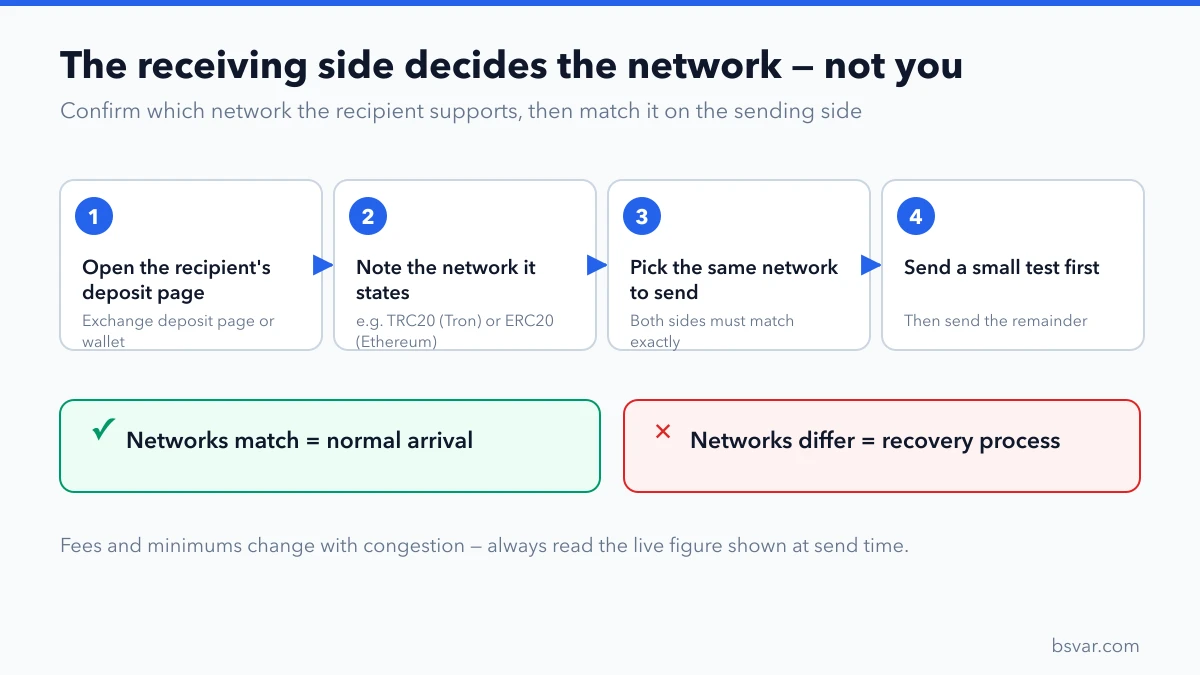
Confirm the receiving side's network before withdrawing — both ends must match.
Crypto withdrawal is not bank withdrawal
Withdraw Crypto sends an on-chain asset to a wallet or another platform. Cashing out to a bank normally requires selling first and using an available fiat or P2P rail. The fees, risk controls, and timing are different.
Binance Academy’s guide describes address entry, network matching, and security verification, while noting that methods vary by location: Deposit/Withdrawal Guide.
What determines the amount that actually arrives
The number you type is not the number that lands. Before confirming, read the estimated received amount rather than the amount field — most platforms display both, and the difference is the withdrawal fee.
Two details cause the most confusion. First, whether the fee is deducted from your amount or added on top of it; platforms differ, and it changes what you should enter if a precise amount must arrive. Second, that the withdrawal fee is normally a flat amount per network, not a percentage — which is why several small withdrawals cost far more in total than one larger one. See How Exchange Withdrawal Fees Actually Work.
Security settings worth having before a large withdrawal
A withdrawal is the one irreversible action in your account, so the protections belong in place beforehand rather than afterwards:
- Address whitelist enabled, so withdrawals can only go to destinations you approved in advance. This is the single most effective protection available — see Withdrawal Address Whitelist.
- Authenticator-app 2FA rather than SMS, with the setup key backed up offline.
- Withdrawal notifications on for every available channel, so an unauthorised attempt is visible immediately.
- A test transfer to any new destination before the full amount.
If a withdrawal is temporarily blocked after you changed a security setting, that is the protection working as designed. Wait out the hold rather than looking for a way around it.
Verifying the destination address properly
Comparing the first and last few characters is the standard advice, and it is exactly the check that address poisoning is built to defeat — an attacker can generate an address matching those visible ends and plant it in your transaction history.
Two habits close the gap: never copy an address from your transaction history, only from the recipient's current receive screen; and when checking manually, compare a run of characters from the middle of the address as well. On a hardware wallet, read the full address on the device screen before confirming. See Address Poisoning: Why the Address You Copied Was Wrong.
FAQ
Can I cancel after choosing the wrong network? You can correct details before submission; a confirmed on-chain transfer is normally irreversible.
Why is the received amount lower? Review the fee and estimated receipt on the confirmation page.
Why is a withdrawal temporarily restricted? Security-setting changes or risk controls may create a waiting period; follow the official account notice.
Independent guide. Live fees, limits, and features depend on the account and jurisdiction.