
Security
Withdrawal Address Whitelist: The Setting That Stops the Costliest Mistake (2026)
A whitelist limits withdrawals to addresses you approved in advance — so a stolen password and 2FA code still are not enough.
Published: August 2026 · By the bsvar editorial team
Short answer: an address whitelist (sometimes called address management or address book lock) restricts withdrawals to a list of addresses you approved in advance. With it on, an attacker who has your password and your 2FA code still cannot send your funds to their own address without first passing a separate approval that takes time — time in which you get notified.
This is the single highest-value security setting most people never turn on. It costs nothing and takes five minutes.
What it actually does
Normally, a withdrawal needs your password and a second factor. That is decent protection against a stolen password alone — but it fails in two very common situations:
- You are phished in real time. A fake site collects your password and the 2FA code you type, and relays both to the real exchange within the 30-second window. Your second factor did its job and still lost.
- Your session is hijacked. Malware or a malicious browser extension acts inside an already-authenticated session, where no fresh login is needed at all.
A whitelist changes the shape of the problem. The attacker no longer needs to defeat your login — they need to add a new destination address, and that action is deliberately slowed down and separately notified. Adding an address typically requires its own confirmation, and many platforms impose a waiting period (commonly around 24 hours) before a newly added address can be used.
That delay is the entire point. It converts a silent, instant theft into a noisy one that you have a chance to stop.
How to set it up
The exact wording differs per exchange, but the flow is consistent:
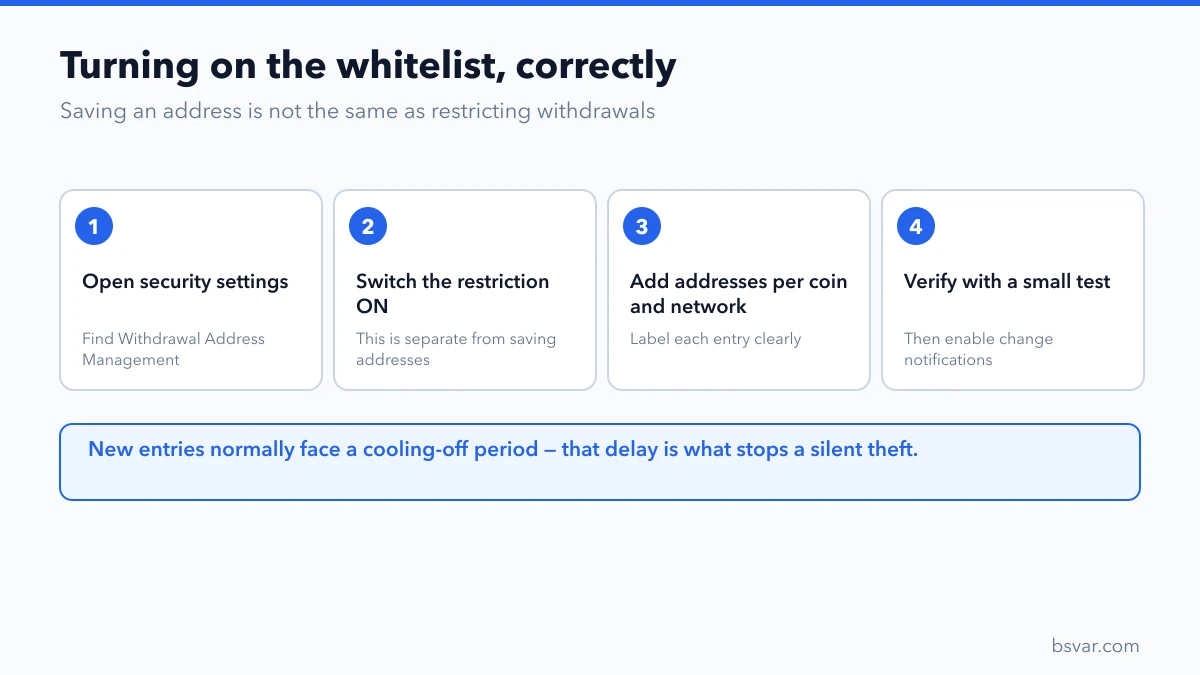
- Open the security or withdrawal settings in your account.
- Find Withdrawal Address Management, Address Whitelist, or similar.
- Turn the whitelist restriction on. This is a separate switch from simply saving addresses — saving an address to your address book does not restrict anything by itself.
- Add the addresses you actually use, one per coin and per network. An address entry is specific to a network.
- Label each entry clearly: "Ledger — BTC", "OKX deposit — USDT TRC20".
- Verify each address by sending a small test amount before you rely on it.
- Confirm that email and app notifications for address changes are enabled.
Then check the two settings that determine how useful it is: whether new addresses have a cooling-off period, and whether withdrawals to non-whitelisted addresses are blocked entirely or merely flagged. Blocked is what you want.
Choosing what goes on the list
Keep it short. A whitelist with forty entries is barely a whitelist.
Good candidates: your own hardware wallet, your own software wallet, deposit addresses at exchanges you use regularly.
Poor candidates: a one-off address for a single payment, an address someone sent you in a chat, anything you have not verified with a test transfer.
For a one-time payment, it is usually better to temporarily allow it, send, and then remove the entry — rather than permanently widening your list.
One caution specific to exchange deposit addresses: platforms rotate them. An address whitelisted a year ago may no longer credit your account. Re-check before a large transfer.
The mistake this setting prevents
Address whitelisting is also the strongest practical defence against address poisoning, where an attacker seeds your transaction history with a lookalike address that matches the first and last few characters of one you really use. You later copy the wrong one from your history and send funds to the attacker.
A whitelist defeats this, because the lookalike address is not on your list, and adding it would require a deliberate confirmation you would notice. See Address Poisoning: Why the Address You Copied Was Wrong.
What it does not do
Be clear about the limits:
- It does not protect a self-custody wallet. This is an exchange feature. A hardware wallet is the equivalent protection for funds you hold yourself.
- It does not stop you from whitelisting an attacker's address if you are socially engineered into it. The delay gives you a chance to notice; it does not think for you.
- It does not protect against account closure, freezes or platform failure. Those are different risks entirely.
- It does not secure trading or API activity — review API key permissions separately, and never grant withdrawal rights to a trading bot you do not fully control.
A five-minute account hardening pass
While you are in the settings, do the rest of it:
- Authenticator-app 2FA enabled, with the setup key backed up offline. See Binance 2FA: How to Set It Up, Back It Up and Recover It.
- Anti-phishing code enabled, so genuine platform emails are identifiable.
- Active sessions and devices reviewed; anything unfamiliar revoked.
- API keys audited; withdrawal permission removed unless genuinely needed.
- Email account secured with its own 2FA and a unique password.
- Withdrawal notifications turned on for every channel available.
FAQ
Does the whitelist delay every withdrawal?
No. The waiting period normally applies to newly added addresses. Withdrawals to established entries proceed as usual.
Can I withdraw urgently to a new address?
Usually only by disabling the whitelist, which itself triggers a security waiting period and notifications. That friction is intentional. Plan ahead rather than disabling it under pressure — feeling rushed is itself a common sign of a scam in progress.
Is this the same as saving an address?
No, and the difference matters. Saving an address is convenience. Enabling the whitelist restriction is what actually blocks withdrawals to everything else.
Do all exchanges offer it?
Most major ones do, under varying names. If an exchange holding significant funds does not offer it, treat that as a meaningful gap.
Should support ever ask me to disable it?
Never. A request to turn off a security feature is one of the clearest indicators of a fraudulent contact.
What if I lose access to a whitelisted wallet?
The whitelist entry is unaffected — it only names a destination. Your problem is wallet recovery, which is separate. Remove the entry once the wallet is gone.
Related guides
- Binance 2FA: How to Set It Up, Back It Up and Recover It
- Address Poisoning: Why the Address You Copied Was Wrong
- How to Withdraw Crypto From Binance to a Wallet
- Cold vs Hot Wallet: What's the Difference and How to Choose
Educational content, not financial advice. Security features and waiting periods are set by each platform and change over time; follow the current official settings in your account. See our Advertising & Commission Disclosure.